 Magnetic tape sounds like a relic. For most people it brings to mind reel-to-reel machines in old films or a box of cassettes in a basement. Yet tape never left the data centre. Large organizations, research institutions and cloud-scale operators still write enormous volumes of data to tape every year, and interest has grown as unstructured data piles up and ransomware makes offline copies more valuable.
That doesn't mean every business should buy a tape library. For most small organizations, tape would be overkill. But the reasons tape storage remains in use say a lot about how to store data that is large, rarely touched and important to keep, and those lessons apply whether or not you ever handle a cartridge.
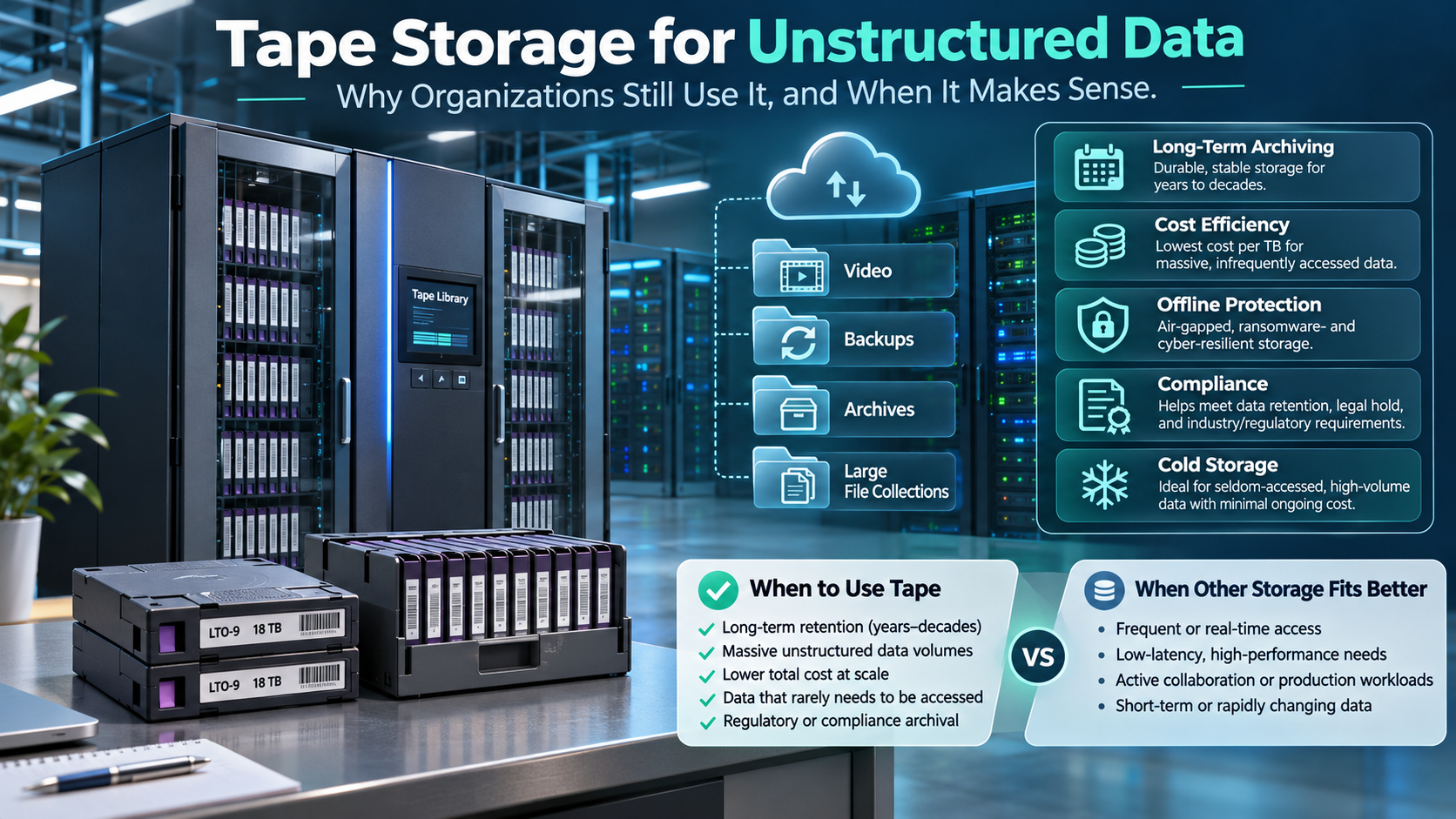
Tape storage is a way of recording data on magnetic tape cartridges that are read and written by tape drives, often inside automated libraries. It suits large volumes of rarely accessed data because it costs little per terabyte, uses no power while cartridges sit on a shelf, and creates copies that are physically offline and out of reach of ransomware. Its main drawback is slow access.
This guide explains what unstructured data is and why it strains storage budgets, how modern tape works, why it still earns its place, how it compares with disk and cloud archive storage, its trade-offs, and how to decide whether your organization needs it. It also covers the alternatives that give smaller organizations the same protection.
What Is Unstructured Data, and Why Is It a Storage Problem?
Structured data fits neatly into rows and columns: customer records, transactions, inventory. Unstructured data is everything else. That includes video and audio, photos and scanned documents, design and engineering files, email archives, logs from servers and applications, medical images, and the ordinary documents and spreadsheets that pile up on shared drives.
Unstructured data makes up the large majority of what most organizations store, and it grows quickly. Higher-resolution cameras, longer recordings, more detailed design files and ever-expanding logs all add up. It also has a particular access pattern. Most files are used heavily for a short time after they're created, then rarely or never again, but they still need to be kept for legal, contractual or business reasons.
Storage professionals describe this with a temperature metaphor:
- Hot data is in active use and needs fast access.
- Warm data is used occasionally and needs reasonably quick access.
- Cold data is rarely accessed but must be retained, sometimes for years.
The problem is that many organizations store all three on the same fast, expensive storage. Cold data quietly consumes capacity, power and backup windows meant for active work. Moving it to a cheaper tier designed for long-term retention frees primary storage and reduces cost. Tape is one of the oldest and still one of the most economical of those tiers.
How Modern Tape Storage Works
Today's business tape market is dominated by a single open format, Linear Tape-Open (LTO), developed by a consortium of storage manufacturers and first released in 2000. LTO has gone through many generations, each roughly increasing capacity per cartridge, and current cartridges hold well over ten terabytes of uncompressed data each.
A tape system has three main parts:
- Cartridges contain the tape itself. They're small, portable and designed to sit on a shelf for long periods.
- Drives read and write the cartridges. A single standalone drive suits small archives.
- Libraries are automated cabinets holding many cartridges and drives, with a robotic mechanism that loads cartridges into drives as needed. Libraries range from small units with a handful of slots to systems holding thousands of cartridges.
Several features make modern tape far more practical than older formats:
- File-system access. The Linear Tape File System (LTFS), introduced with the fifth LTO generation, lets a tape be mounted and browsed much like a disk drive, with files and folders visible to ordinary software. That makes tape easier to use for archives and for moving large datasets between organizations.
- Built-in encryption. LTO drives have supported hardware encryption for several generations, so data can be encrypted as it's written without slowing the drive.
- Write-once options. WORM (write once, read many) cartridges can't be overwritten or erased after writing, which suits records that must remain unaltered.
- Long media life. Manufacturers rate LTO media for decades of storage under proper temperature and humidity conditions.
Generations and compatibility
Each new LTO generation increases capacity, but drives can only read a limited number of earlier generations. Historically, a drive could read cartridges from two generations back. In recent generations, compatibility has narrowed to one generation back. In practice, that means an archive can't simply sit on old cartridges forever. As drives age out, data needs to be migrated to newer media, a task that should be planned from the start.
Why Tape Still Earns Its Place
Several characteristics explain why tape storage remains part of serious storage strategies.
Low cost for cold data. Once you own the drives or library, each additional cartridge adds a large amount of capacity at a low cost per terabyte. For archives measured in hundreds of terabytes or more, tape is usually among the cheapest ways to keep data for the long term.
Almost no power at rest. A cartridge on a shelf uses no electricity and needs no cooling beyond normal environmental control. Spinning disks draw power around the clock. For large archives, that difference affects both operating costs and an organization's energy footprint.
A genuine air gap. A cartridge that has been ejected and stored is physically disconnected from every network. Ransomware, a compromised administrator account or an accidental deletion command can't reach it. That's why offline copies feature so prominently in modern ransomware guidance, and why tape has found new relevance as a recovery copy. Our guide to backups that survive a ransomware attack [URL pending: ransomware article] explains how an offline copy fits into a wider backup plan.
Portability. Cartridges are compact and robust, which makes them practical for off-site storage and for moving very large datasets when sending them over a network would take too long.
Capacity that keeps growing. The LTO roadmap continues to plan higher-capacity generations, so the amount of data a single cartridge holds keeps increasing.
Use at very large scale. Organizations with truly massive archives, such as research institutions, broadcasters and large cloud operators, rely on tape for the coldest tiers of their storage, which keeps the technology well supported.
Tape Storage vs Disk vs Cloud Archive Storage
Tape is one of three main options for long-term data. Each balances cost, speed, control and protection differently.
| Factor | Tape (on-site or off-site) | Disk (NAS, servers, external drives) | Cloud archive storage tiers |
| Access time | Seconds to minutes per cartridge if in a library; longer if off-site | Immediate | Ranges from fast to hours, depending on the tier |
| Cost profile | Higher upfront (drives, library); low cost per added terabyte | Moderate upfront; scales with drives and power | No upfront hardware; ongoing monthly fees plus retrieval and transfer charges |
| Power while idle | None for shelved cartridges | Continuous for spinning disks | Provider's concern, reflected in pricing |
| Offline / air-gapped copy | Yes, once ejected | Only if drives are disconnected and stored | Not physically offline; immutability features can lock data against deletion |
| Media life | Decades under proper conditions | Typically several years per drive | Provider-managed |
| Management burden | Rotation, cataloguing, environment, migration | Hardware replacement, monitoring | Account security, cost monitoring, retrieval planning |
| Data location | Wherever you store the cartridges | Wherever the hardware sits | The region and provider you choose |
| Best for | Large, cold archives; offline recovery copies | Hot and warm data; small archives | Organizations without hardware that need off-site retention |
Most organizations that use tape don't use it alone. A common pattern keeps active data on disk, sends recent backups to disk or cloud for quick restores, and writes older backups and archives to tape for long-term, offline retention.
Tape behind disk: the common hybrid
Few organizations send backups straight to tape any more. The usual design, often called disk-to-disk-to-tape, writes backups first to disk, where recent restores are fast, and then copies them to tape on a schedule for long-term and offline retention. Some backup services work the same way with cloud storage in the middle tier. The result combines quick recovery for everyday mistakes with an offline copy for disasters and ransomware.
The Trade-Offs
Tape's strengths come with real limitations, and they decide whether it fits.
Slow retrieval. Reading a file from tape means loading a cartridge and winding to the right position. In a library that takes seconds to minutes. From off-site storage, it can take hours or days. Tape is a poor fit for anything that needs quick, frequent access.
Upfront investment. Drives and libraries are a capital expense, and the economics only work once an archive is large enough to spread that cost.
Migration as generations change. Because drives read a limited range of older cartridges, long-term archives must be copied to newer media periodically. That takes time, planning and verification.
Handling and environment. Cartridges need proper storage conditions, careful handling and secure transport. Lost or stolen cartridges containing personal information are a privacy breach, which is why encryption matters.
Skills and discipline. Someone has to run backup jobs, rotate and label cartridges, maintain a catalogue of what's on each one, and test restores. Without that discipline, a tape archive can become a pile of unlabelled cartridges no one can confidently restore.
Testing. As with any backup, a tape that has never been restored is an assumption. Regular test restores are essential.
Calculating Whether Tape Pays Off
Whether tape saves money depends on volume, retention and how often you retrieve data. Prices change too often to be worth quoting, but the cost elements are stable, and listing them for each option makes the comparison honest.
| Cost element | Tape | Disk | Cloud archive |
| Upfront hardware | Drives or library | Storage servers, NAS or drives | None |
| Capacity growth | Additional cartridges | Additional drives or enclosures | Monthly storage fee per terabyte |
| Power and cooling | Library and drives only; shelved cartridges need none | Continuous for all online capacity | Included in price |
| Off-site storage | Vaulting service or a second site | A second site or rotated drives | Built in, depending on tier and region |
| Retrieval | Staff time; transport if off-site | Minimal | Retrieval and data transfer fees; possible delays |
| Refresh and migration | Copy to new generations periodically | Replace drives every few years | Handled by provider; leaving may incur transfer fees |
| Labour | Rotation, cataloguing, testing | Monitoring and replacement | Account and cost management |
A few patterns usually hold. Tape's fixed costs make it uneconomical for small archives, but its low cost per added terabyte makes it increasingly attractive as an archive grows. Cloud archive storage starts cheaply and scales smoothly, but monthly fees accumulate year after year, and retrieving large amounts of data can be expensive. Disk is the most convenient but the most costly to keep running at large capacity.
To compare fairly, estimate your archive size today and in five years, how much you expect to retrieve each year, and how long you must keep data. Then total each option's costs over the full retention period, including labour and migration, rather than comparing first-year prices.
How a Tape Rotation Works
A tape archive is only as good as the routine around it. Most organizations use a rotation scheme that balances how far back they can restore against how many cartridges they need.
A widely used approach is grandfather-father-son rotation:
- Son: daily backups, with cartridges reused on a weekly cycle.
- Father: weekly full backups, kept for a month or more.
- Grandfather: monthly full backups, kept for a year or longer, with some retained as long-term archives.
Around the rotation, a few practices make the difference between an archive and a pile of cartridges:
- Label everything clearly, with barcodes where a library uses them, and record contents in a catalogue.
- Send copies off-site on a schedule through a secure vaulting service or to a second location, with a record of who handled each cartridge.
- Encrypt cartridges before they leave the building, and store keys separately and securely.
- Retire cartridges after their rated number of uses or when errors appear.
- Test restores from different points in the rotation, including the oldest archives.
Common Mistakes with Tape Archives
Tape failures are rarely caused by the tape itself. They usually trace back to process.
- Never testing restores. The archive is assumed to work until the day it's needed.
- Keeping only one copy. A single cartridge set, stored in one place, is one fire, flood or misplaced box away from loss.
- No catalogue. Without a record of what's on each cartridge, finding a specific file means loading cartridge after cartridge.
- Unencrypted off-site cartridges. A lost box of unencrypted cartridges holding personal information is a privacy breach.
- Lost encryption keys. Encrypted cartridges without their keys are unreadable forever.
- Ignoring generation changes. Archives left on old cartridges until the last compatible drive fails can become unreadable.
- Poor storage conditions. Hot, humid or dusty storage rooms shorten media life.
Does Your Organization Need Tape?
For most small businesses, the honest answer is no, at least not directly. The volumes are too small to justify drives and libraries, and simpler options provide the same protection. Tape starts to make sense when several of these conditions are true:
- You hold tens or hundreds of terabytes of data that's rarely accessed but must be kept.
- Retention periods run for many years, because of regulation, contracts or the nature of the work.
- You need an offline copy that can't be reached by ransomware or account compromise, at a scale where disconnected disks become unwieldy.
- You have, or can buy in, the skills to manage rotation, cataloguing and migration.
Organizations that often fit this profile include video and media production studios, architecture and engineering firms with large design archives, research groups, imaging-heavy health practices, and professional firms with long record-retention obligations.
Alternatives that give smaller organizations the same benefits
If tape is more than you need, the same principles can be applied with simpler tools:
- Rotated external drives. Back up to an external drive, disconnect it, and rotate it with another drive kept off-site. It's basic, but it creates a true offline copy.
- A network storage device plus an offline copy. Keep quick restores on a NAS and periodically copy to a drive that's then disconnected.
- Cloud archive storage with immutability. Many cloud storage services offer archive tiers and object-lock features that prevent deletion for a set period, even by an administrator. They're not physically offline, but they protect against deletion and encryption by an attacker who doesn't control the storage account itself.
- Your hosting provider's backups, plus your own copy. For websites and hosted applications, provider backups help with quick restores, but an independent copy kept elsewhere protects against account-level problems.
A quick decision test
Ask yourself three questions. How much cold data do you hold, and how fast is it growing? How long must you keep it? How would you recover if every connected system and account were compromised at once? If the answers are "a lot", "many years" and "we couldn't", tape or an equivalent offline archive deserves serious consideration.
Designing an Archive Tier: Practical Steps
Whether you choose tape, disconnected disks or cloud archive storage, a well-designed archive follows the same steps.
- Find your cold data. Identify files and backups that haven't been accessed in months but must be kept. Many storage systems can report on file age and last access.
- Set retention rules. For each type of data, decide how long it must be kept and why: tax rules, contracts, professional obligations or business need. Decide when it should be destroyed.
- Choose the medium based on volume, retrieval needs, budget and skills.
- Encrypt archives and keep the encryption keys safe and separately backed up. An archive you can't decrypt is lost.
- Keep at least one copy off-site and offline or immutable.
- Catalogue everything. Record what's on each cartridge, drive or archive, when it was written and when it can be destroyed.
- Test restores on a schedule, including from the oldest media you hold.
- Plan migrations before media or drives become obsolete.
- Destroy data securely when its retention period ends.
Retention, Privacy and Archives in Canada
Archives raise specific legal questions for Canadian organizations.
Tax records. The Canada Revenue Agency generally requires businesses to keep books and records for six years from the end of the last tax year they relate to, with some exceptions and longer periods in certain situations. Electronic records must remain readable for that period. An archive in a format you can no longer read doesn't meet the requirement.
Keeping personal information only as long as needed. The Personal Information Protection and Electronic Documents Act (PIPEDA) requires organizations to keep personal information only as long as necessary for the purposes it was collected for, and then to destroy, erase or anonymize it. That creates a tension with the instinct to archive everything indefinitely. A good archive design follows retention rules in both directions: long enough to meet legal obligations, and no longer than necessary for personal information.
Safeguards apply to archives too. PIPEDA's safeguards principle covers archived data as much as live systems. Off-site cartridges, external drives and cloud archives holding personal information should be encrypted, tracked and stored securely. Losing an unencrypted backup containing personal information can be a reportable breach.
Location still matters. Where archived copies physically sit affects which laws apply to them. If your organization, your clients or your sector require Canadian storage, that requirement applies to backups and archives just as it does to production systems. Our guide to weighing private and public cloud options for Canadian organizations [URL pending: cloud article] covers the location and jurisdiction questions in more detail.
Sector and professional rules. Health, legal, accounting and other regulated professions often have their own record-retention requirements, set by provincial law or professional bodies. Check those alongside the general rules.
Where Hosting Fits
Hosting and archives meet at a few points. A website or hosted application generates its own data: files, databases, uploaded media, logs and backups. That data needs the same tiered thinking as everything else, with recent backups for quick restores and older or independent copies kept somewhere separate.
When you work with a Canadian web hosting provider, it helps to know where your site and its backups are stored, how long backups are kept, and how you can download your own copies to add to your archive. If your website or application runs with 4GoodHosting, ask the team how your plan's backups are handled and stored, so you can decide what to keep in your own archive.
For organizations whose hosted workloads involve large volumes of media or data, storage capacity becomes a deciding factor in the hosting choice. Dedicated server hosting gives predictable capacity and performance for active data, while the archive tier, whether tape, disconnected disk or cloud, holds the cold data that doesn't need to stay on a live server. Keeping both in Canada, for example with the active tier on servers in Vancouver and Toronto facilities, keeps location questions simple.
Three Scenarios
A Vancouver video production studio generates several terabytes of raw footage per project. Active projects live on fast shared storage, and finished projects are written to two sets of LTO cartridges: one in a small library at the studio and one stored off-site. When a client asks for a re-edit years later, the studio restores the project from tape in an afternoon. Moving cold footage off primary storage has also kept the studio from repeatedly buying more fast storage.
A Calgary engineering firm must keep project records for many years under its professional obligations. Its design archive has grown steadily, and an outside review recommended an offline copy after a ransomware scare at a peer firm. The firm writes quarterly archives to encrypted tape, catalogues every cartridge, and tests a restore from its oldest generation each year to confirm it can still be read.
A three-dentist clinic in Halifax considered tape after reading about it, then concluded it was more than the practice needed. Its data fits easily on a network storage device with nightly backups, a cloud backup with object lock enabled, and a rotated external drive stored off-site. The clinic gets an immutable copy and an offline copy without buying a tape drive, and keeps its retention schedule in line with provincial health-record rules.
Where Archive Storage Is Heading
Unstructured data will keep growing, and the economics of storing it will keep pushing organizations toward tiered designs. Tape's roadmap continues to plan higher capacities, cloud providers continue to offer cheaper archive tiers, and ransomware continues to reinforce the value of copies attackers can't reach.
What changes less is the underlying discipline. Know what data you have, decide how long to keep it, store cold data somewhere cheaper and safer than primary storage, keep at least one copy offline or immutable, and test that you can get it back. Tape is one way to do that at scale. For smaller organizations, simpler tools can do the same job, as long as the principles are followed.
FAQ
Is tape storage still used today?
Yes. Large organizations, research institutions, broadcasters and cloud-scale operators still use tape for long-term archives and offline backup copies. It's valued for its low cost per terabyte for cold data, its lack of power use while cartridges sit on a shelf, and the protection an offline copy gives against ransomware.
What is unstructured data?
Unstructured data is information that doesn't fit neatly into database rows and columns: video, audio, photos, scanned documents, design files, email archives, logs and everyday documents. It makes up the bulk of what most organizations store, grows quickly, and is often rarely accessed after its first few months.
What is LTO tape?
Linear Tape-Open (LTO) is the open tape format used by most business tape systems. It has gone through many generations, each increasing capacity per cartridge. Modern LTO supports file-system access through LTFS, built-in encryption and write-once cartridges.
Is tape better than cloud storage for archives?
It depends on scale and needs. Tape is usually cheaper for very large, cold archives and creates a truly offline copy, but it needs hardware, skills and patience for slow retrieval. Cloud archive storage needs no hardware and offers immutability features, but adds ongoing fees and retrieval charges. Many organizations use both.
Does a small business need tape backup?
Usually not. Most small businesses can get an offline or immutable copy more simply, with rotated external drives, a network storage device plus a disconnected copy, or cloud backup with object lock. Tape starts to make sense with tens of terabytes or more of cold data and long retention periods.
How long does tape last?
Manufacturers rate LTO media for decades under proper temperature and humidity conditions. In practice, the limit is usually drive compatibility rather than the tape itself, since drives read only a limited range of older generations. Plan to migrate archives to newer media periodically.
How long do Canadian businesses have to keep records?
The Canada Revenue Agency generally requires businesses to keep books and records for six years from the end of the last tax year they relate to, with some exceptions. Sector and professional rules can require longer. Under PIPEDA, personal information should be kept only as long as needed, then securely destroyed.
Key Takeaways
- Tape storage suits large volumes of rarely accessed data: it's low-cost per terabyte, uses no power on the shelf and creates genuinely offline copies.
- Unstructured data grows quickly and is mostly cold after a short time, so tiering it off primary storage saves money and capacity.
- Modern LTO tape supports file-system access, encryption and write-once cartridges, but drives read only a limited range of older generations, so archives need planned migration.
- Tape's trade-offs are slow retrieval, upfront hardware cost, and the discipline needed to catalogue, rotate and test.
- Most small businesses don't need tape. Rotated offline drives and immutable cloud backups apply the same principles more simply.
- In Canada, archives must meet record-retention rules and PIPEDA's limits on keeping personal information, and safeguards apply to archived copies too.
Conclusion
Tape storage has outlasted many predictions of its demise because it solves a problem that keeps getting bigger: keeping large amounts of rarely used data safely and cheaply for a long time. Its low cost at scale, zero power use on the shelf and genuine air gap make it a natural fit for cold archives and recovery copies, even as faster technologies dominate everyday work.
That doesn't make tape the right answer for everyone. For most small organizations, the volumes are too small and the management overhead too high. What every organization can take from tape is the thinking behind it: separate hot data from cold, set retention rules in both directions, keep at least one copy that attackers can't reach, and prove you can restore it.
Whether your archive ends up on tape, on disconnected drives or in an immutable cloud tier, those principles are what make it reliable.
Your active data deserves infrastructure you can rely on, and your archive plan should know exactly where it lives. 4GoodHosting provides server options for data-heavy sites and applications and VPS plans for growing workloads, hosted in Canada. Talk to the team about how your hosted data and backups are stored, so your archive plan covers everything.