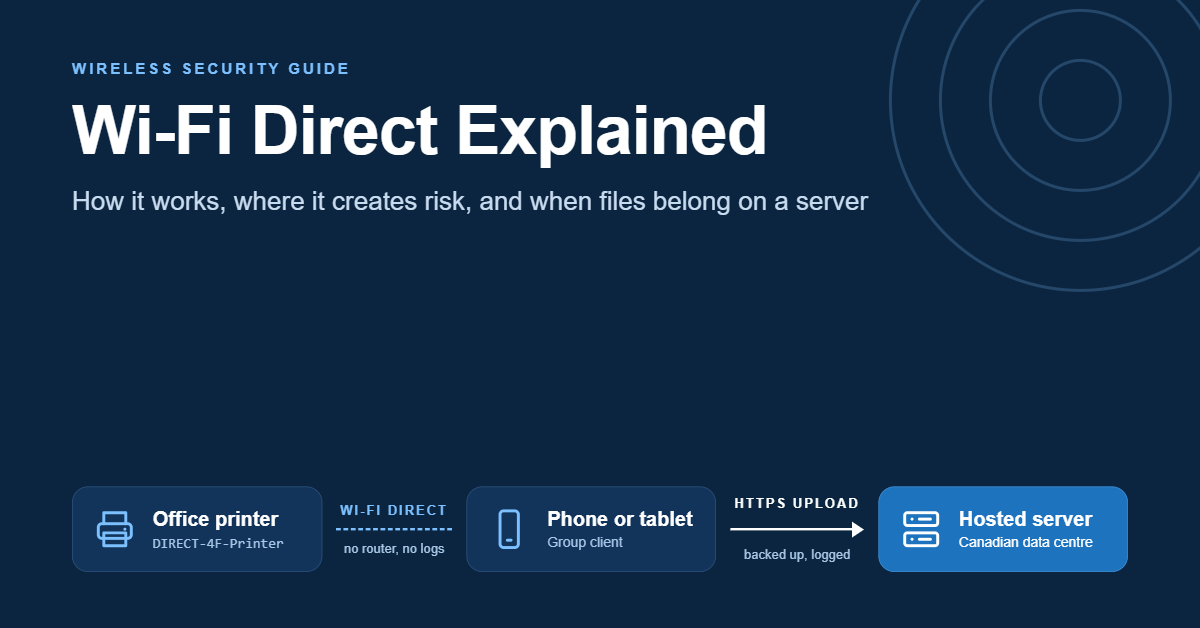
 Open the Wi-Fi list on your phone in almost any office lobby and you will probably see a network nobody set up on purpose. It might be called DIRECT-4F-Printer-2ndFloor or DIRECT-xy-Boardroom. It doesn't appear on the network diagram and IT never configured it, yet it is broadcasting from a device a few metres from the accounting team. That network is Wi-Fi Direct at work. It's the reason a topic that sounds like gadget trivia belongs in a business conversation about infrastructure.
Wi-Fi Direct is a Wi-Fi Alliance standard that lets two or more devices connect to each other over ordinary Wi-Fi radios without a router, access point or internet connection. One device takes on the job an access point would normally do. The others join it, and data moves directly between them at Wi-Fi speeds.
The convenience is real. A guest can print from their phone, a laptop can mirror to a meeting-room display, and a large video can move between two phones in seconds. The same design also creates small, self-managed networks that sit outside the controls an organization relies on. They have no firewall policy, no central logging and no backup, and they pair using methods that were never built for hostile environments.
This guide explains what Wi-Fi Direct is and how a connection actually forms. It compares Wi-Fi Direct with Bluetooth and newer peer-to-peer options, shows where it creates security exposure in an office, and sets out how to lock it down without breaking printing. It ends with the point where business files should stop moving device to device and start living on a properly hosted server.
What Is Wi-Fi Direct?
Wi-Fi Direct is a peer-to-peer mode of Wi-Fi. Standard Wi-Fi works like a hub with spokes: every laptop, phone and printer connects to an access point, and the access point moves traffic between them and out to the internet. Wi-Fi Direct removes the hub. Two devices that support it can find each other, agree on which one is in charge, set up an encrypted link and exchange data, with no router involved.
The Wi-Fi Alliance, the industry body that certifies Wi-Fi products, launched its Wi-Fi Direct certification in 2010. The technical document underneath it is the Wi-Fi Peer-to-Peer (P2P) specification. That's why developer documentation and operating-system menus often say "Wi-Fi P2P" instead. Both names describe the same thing.
Four properties define it:
- It uses the same radio as normal Wi-Fi. No extra chip is needed, so throughput and range follow the Wi-Fi generation the devices support rather than Bluetooth's much lower ceiling.
- Only one device needs Wi-Fi Direct support for a basic connection. The device acting as group owner looks like an ordinary access point to older equipment, which is how a legacy laptop can join a printer's Direct network.
- It does not provide internet access on its own. A Wi-Fi Direct group is a private link between its members. Some devices can share an internet connection across it, but that is a separate feature built on top.
- It is encrypted at the link layer when set up through the standard process, using WPA2-level protection. How well that protection holds up depends heavily on how the devices pair, which later sections cover.
What Wi-Fi Direct is not
The name invites confusion, so it helps to rule a few things out.
It isn't a mobile hotspot. A hotspot shares a phone's cellular data with nearby devices. Wi-Fi Direct is about devices talking to each other, with or without internet.
It isn't Bluetooth under another name. Both are short-range wireless technologies, but Bluetooth uses a different radio protocol designed around low power and small amounts of data. Wi-Fi Direct trades battery life for far higher throughput.
It isn't a storage service. Nothing is kept anywhere except on the devices involved. When the session ends, the only record of what was shared is whatever those devices retained, which is often nothing at all.
That last point matters more than it first appears. It's where the hosting conversation eventually starts.
How a Wi-Fi Direct Connection Actually Forms
Most explanations of peer-to-peer Wi-Fi stop at "devices connect without a router". The detail is worth knowing, because each stage of the process maps to a specific risk and a specific control.
Discovery: finding nearby devices
A device looking for a peer-to-peer connection starts by announcing itself and listening for others. It alternates between sending probe requests and listening on three 2.4 GHz channels, normally 1, 6 and 11, which the specification calls the social channels. Devices that hear each other swap basic details: a device name, a device type such as printer, phone or display, and the services on offer.
That's why a phone's Direct settings screen can list a printer two rooms away. Discovery is designed to be easy, which also makes it visible to anyone nearby who looks.
Some devices go further with service discovery and advertise specific capabilities, like printing or screen mirroring, before any connection exists. Software can then show only relevant devices. The trade-off is that an observer learns exactly what kind of equipment is in the building.
Group owner negotiation: deciding who is in charge
Every group has a group owner. The group owner behaves like a software access point. It picks the channel, hands out addresses (usually by running a small DHCP service) and decides who can join. The other devices become clients.
When two devices meet, they negotiate. Each declares an "intent" value from 0 to 15 showing how strongly it wants to be group owner, and the higher value wins, with a tie-breaker for equal values. Printers and displays usually take the group owner role, because they are stationary, plugged in and expected to serve several devices. Phones usually prefer to be clients to save battery.
A device can also form an autonomous group, starting as group owner immediately and simply waiting for others to arrive. A printer advertising a DIRECT- network is doing exactly this.
The network name follows a rule in the specification. Group names begin with "DIRECT-" followed by two characters, and manufacturers usually add a model or device name after that. The fixed prefix is handy during audits, because it makes Direct groups easy to pick out of a wireless scan.
Provisioning and encryption: how devices get the key
With roles settled, the devices need a shared secret to encrypt traffic. The specification uses Wi-Fi Protected Setup (WPS) for this provisioning step, usually through one of two methods:
- Push button. Someone presses a physical or on-screen button on both devices within a short window, and the key is exchanged automatically.
- One device shows a PIN and the user types it into the other, or a fixed PIN printed on a label is used.
After provisioning, traffic in the group is protected with WPA2-Personal using AES encryption. The encryption itself is sound. The weak point, as the security section explains, is WPS: the way the key gets handed over in the first place.
Persistent groups and concurrent connections
Two more behaviours matter in a business setting.
Persistent groups. Devices can store the credentials from a successful connection and reconnect later without pairing again. That suits a phone that prints every day. It also means a device that paired once, such as a former employee's personal phone, may be able to rejoin without anyone approving it until the stored group is cleared.
Concurrent operation. Many devices can stay on the office Wi-Fi network and in a Direct group at the same time. A laptop on the corporate network can also be in a Direct group with a display or another laptop. The specification recognizes the risk of a device bridging the two. It includes a provision that lets a managed access point signal whether that kind of cross-connection is allowed. Whether a given device honours the signal varies, so in practice endpoint policy carries most of the weight.
Where Wi-Fi Direct Shows Up in a Business
Wi-Fi Direct rarely appears on a purchase order. It arrives built into equipment bought for other reasons. The usual places to find it:
- Printers and multifunction devices. This is the most common case by far. Many office printers ship with Wi-Fi Direct switched on so guests and mobile devices can print without joining the corporate network.
- Meeting-room displays and screen mirroring. Miracast, the Wi-Fi Alliance's screen-mirroring certification, is built on Wi-Fi Direct. Smart TVs, conference displays and streaming adapters often advertise it.
- Phone-to-phone and phone-to-laptop sharing. Android exposes Wi-Fi Direct to apps, and many nearby-sharing and file-transfer apps use it to move large files quickly. Support differs across platforms. Apple devices have historically used their own peer-to-peer link for features such as AirDrop rather than standard Wi-Fi Direct, so check current platform documentation before building a cross-platform workflow around it.
- Cameras, scanners and field equipment. Digital cameras, handheld scanners, inspection tools and some laboratory instruments use Wi-Fi Direct to send captures to a phone or tablet where there is no network.
- Device setup. Building sensors, point-of-sale accessories and other connected devices sometimes use a temporary Direct link during setup, then move to the main network.
- Events and pop-up operations. Check-in tablets, badge printers and portable receipt printers at trade shows and pop-up retail often rely on Direct links because venue Wi-Fi is unreliable.
In most of these cases the business benefit is genuine, and the alternative would be worse. A sales rep at a client site who can't print a contract is losing time. So is a field inspector with no signal who can't get photos off a camera. The goal isn't to eliminate Wi-Fi Direct. It's to know where it is, control how it pairs and decide what kind of data is allowed to travel over it.
Wi-Fi Direct vs Bluetooth vs Wi-Fi Aware vs Your Office Network
People usually land on Wi-Fi Direct while comparing ways to move data between devices. Speed is only part of the comparison. The more useful question is how much control each option gives the organization.
| Wi-Fi Direct | Bluetooth | Wi-Fi Aware | Office Wi-Fi network | Hosted file sharing | |
| What it connects | Devices to each other, no router | Devices to each other, low power | Nearby devices discover, then connect | Devices through managed access points | Users to a server over the internet |
| Typical strength | Large files, printing, screen mirroring | Peripherals, audio, small data | Proximity discovery and quick links | Everyday connectivity under policy | Shared, backed-up, remotely reachable files |
| Throughput | Wi-Fi class | Far lower | Wi-Fi class | Wi-Fi class | Limited by the internet link |
| Central visibility | Little or none | Little or none | Little or none | Firewall, logging, segmentation | Access logs, permissions, retention |
| Works without internet | Yes | Yes | Yes | Locally, yes | No |
| Record of who received what | Only on the devices | Only on the devices | Only on the devices | Network-level only | Yes, per file and per user |
A few practical points follow from the table.
Bluetooth is not a substitute for bulk transfer. It is excellent for keyboards, headsets and sensors, and its low power draw makes it the right choice for always-on accessories. For a 2 GB video or a folder of high-resolution site photos, it is far slower than any Wi-Fi option.
Wi-Fi Aware is the newer peer-to-peer approach. Also certified by the Wi-Fi Alliance and formally known as Neighbor Awareness Networking, it focuses on letting devices discover each other and nearby services efficiently before deciding to connect. Android supports it, and support on other platforms has been expanding. For a business, it carries the same core trade-off as Wi-Fi Direct: convenient local links with little central oversight.
The office network and hosted file sharing answer different questions. The office network decides how devices reach each other and the internet, under policy. Hosted file sharing decides where business data lives, who can reach it and what happens to it over time. Wi-Fi Direct answers neither. It solves one problem, getting data between two devices right now, and nothing more.
Wi-Fi Direct Security: Networks Nobody Approved
Security teams tend to discover Wi-Fi Direct the same way. A wireless survey, a penetration test or a curious employee turns up a network nobody authorized. The risks aren't exotic, but they add up, because each one sits outside normal controls.
The DIRECT- network on the printer
A printer broadcasting a Wi-Fi Direct group is effectively running its own access point inside the building. Anyone in range can see it, and depending on configuration, anyone may be able to connect.
Once connected, a visitor shares a network segment with a device that also sits on the corporate network. Many multifunction printers expose a web administration page, scan-to-email and scan-to-folder functions, stored address books and job histories. If administration is protected by a default or weak password, someone in the parking lot may be able to change settings, read stored contacts or redirect scans.
The printer becomes the bridge. Firewalls and segmentation assume traffic enters through managed access points and switches, and a Direct group on a networked printer is a side door those controls never see. It's a small-scale example of how modern attacks get around the network perimeter rather than through it.
WPS: the weakest link in pairing
WPS was designed to make home Wi-Fi setup easier, and the peer-to-peer standard inherited it as its provisioning method. The PIN method has a well-documented design flaw. In late 2011, a security researcher showed that the eight-digit PIN is checked in two halves and that the last digit is only a checksum. That cuts the number of guesses needed from about 100 million to roughly 11,000, which is small enough to brute-force. The CERT Coordination Center published an advisory on the weakness. Later research showed that some chipsets generate the secret values in the exchange so poorly that the PIN can be recovered offline in seconds.
In a Direct setting, that has three practical consequences:
- A static PIN printed on a device label is a shared secret known to everyone who has seen the device.
- Push-button pairing opens a window during which any nearby device that also triggers pairing can join. In a busy office or lobby, a short window is long enough.
- A device that leaves PIN pairing on indefinitely gives a nearby attacker unlimited time to work through the reduced number of guesses, unless it locks out repeated failures.
None of this breaks WPA2 encryption once a connection is up. It sidesteps it by obtaining the key through a weak handshake.
Concurrent connections and bridging
A laptop on the corporate network that is also in a Direct group is, in principle, a path between the two. Most operating systems don't route traffic between them by default, but misconfiguration, sharing features or malware can change that. This is the scenario the specification's cross-connection controls exist for, and it is why endpoint policy matters as much as network policy.
Firmware and driver flaws
Peer-to-peer Wi-Fi lives in device firmware and in each operating system's Wi-Fi software. Like any code that processes data from untrusted nearby devices, it has had vulnerabilities. Android's monthly security bulletins, for example, have included fixes for serious flaws in the peer-to-peer handling of the open-source Wi-Fi component used by many Android devices. Printers and displays are often in a worse position, because their firmware is rarely updated after installation.
A device that never receives updates and keeps an always-on Direct group is a long-lived, unmonitored listening service. That is the profile attackers look for.
What a wireless review usually finds
A first wireless review of a small or mid-sized office tends to surface a familiar pattern:
- several DIRECT- networks from printers that left the factory with the feature enabled
- at least one meeting-room display advertising screen mirroring to anyone in range
- default administration passwords on one or more multifunction devices
- persistent pairings from phones that no longer belong to staff
Each item is minor on its own. Together they describe a wireless perimeter the organization doesn't actually control.
How to Lock Down a Wi-Fi Direct Printer Without Breaking Printing
The fix is mostly configuration and policy, not new equipment. A sensible order of work:
- Inventory what is broadcasting. Walk the office with a laptop or phone that can scan Wi-Fi networks, and list every network name beginning with "DIRECT-". Match each one to a device. Repeat whenever new equipment arrives.
- Decide per device whether Direct is needed. A lobby printer used by guests may justify it. The finance team's multifunction device almost certainly doesn't. Switch the feature off wherever there's no clear business use.
- Where it stays on, tighten pairing. Disable WPS PIN pairing if the device allows it. If push-button is the only option, require the button on the device itself, so a person has to be physically present.
- Set a strong administration password on every printer, display and scanner. Disable administration over the Direct interface wherever the device offers that option.
- Restrict what Direct clients can reach. Many business printers can limit Direct users to printing only, blocking web administration, scan destinations and stored address books.
- Clear persistent groups regularly and whenever staff leave, both on shared devices and through mobile device management on company phones.
- Patch firmware on a schedule. Treat printers and displays as network devices, not appliances, and put them on the same patch cycle as servers and laptops [URL pending: patch management article].
- Manage endpoints. Use operating-system or mobile device management policy to turn off Wi-Fi Direct on company laptops that don't need it. Where the platform allows, block simultaneous membership of the corporate network and an ad-hoc group.
- Write it down. A one-page note explaining what can and can't be shared device to device, and why, changes behaviour more than most technical controls.
Where guest printing genuinely matters, a common compromise is to put guests on an isolated guest Wi-Fi network with access to a single print queue, and switch Direct off entirely. Guest printing then comes back under the same logging and segmentation as everything else.
What Wi-Fi Direct Can't Do for Business Data
Security is half the picture. The other half is that the technology was designed to move data, not to manage it. That becomes obvious as soon as an organization relies on it for anything beyond printing.
No backup. A file sent from a camera to a phone exists on two devices. If the phone is lost before anything else happens, the file may be gone.
No versioning. If two staff members edit copies of the same document after passing it back and forth, nothing records which version is current, and there is no way to roll back.
No access control beyond pairing. Once two devices are paired, anything the sending app allows can be sent. There are no folder permissions or expiring links, and no way to withdraw a file after it arrives.
No audit trail. Nothing records who sent what to whom. If a client asks whether their documents were shared outside the team, the honest answer may be "we can't tell".
No remote access. A Direct link only works within radio range. A colleague in another city can't reach the file, and neither can the same employee working from home that evening.
No retention or deletion policy. Files received over Direct sit in download folders and camera rolls indefinitely, outside any retention schedule the organization has set.
For a quick, one-off transfer of non-sensitive material, none of this matters. For anything a business depends on, such as client records, signed contracts, inspection photos, invoices and staff files, every item on that list is a gap.
The Privacy Angle for Canadian Organizations
For Canadian organizations that collect personal information in the course of commercial activity, those gaps have a regulatory side. The federal private-sector privacy law, the Personal Information Protection and Electronic Documents Act (PIPEDA), sets out fair information principles that apply however the data moves.
Two of those principles are directly relevant. Accountability makes an organization responsible for personal information under its control, including information it passes to others for processing. Safeguards requires security protections that match the sensitivity of the information, combining physical measures, organizational measures such as need-to-know access, and technological measures such as encryption and passwords.
Ad-hoc device-to-device transfers are hard to square with either. When client files move phone to phone, it's difficult to show who had access, to limit access to the people who need it, or to demonstrate that the protection matched the data.
Breach obligations sharpen the point. Since November 2018, organizations subject to PIPEDA have had to report breaches of security safeguards that create a real risk of significant harm to the Office of the Privacy Commissioner, and notify the people affected. They must also keep a record of every breach, reportable or not, for 24 months. An organization that can't say which devices hold which client files will struggle to assess a lost phone, let alone document it.
Some organizations also face rules about where data is stored. PIPEDA itself doesn't require personal information to stay in Canada. The Privacy Commissioner's guidance does expect organizations that process data outside the country to stay accountable for it and be transparent about it. Quebec's private-sector privacy law requires an assessment before personal information is communicated outside the province. Public bodies, health information custodians and their contractors may be bound by provincial rules or contract terms that are stricter still.
The takeaway isn't that Wi-Fi Direct is unlawful. It's that personal information should live somewhere the organization can control, log and secure, and that where that place is located is itself a compliance decision.
When Files Belong on a Server: Hosted File Sharing as the Alternative
For business data, the natural alternative to device-to-device transfer is hosted file sharing. Files sit on a server reachable over the internet, stored once and shared by permission rather than by copy.
What a hosted setup provides that Wi-Fi Direct can't
A properly configured hosted file-sharing environment closes each gap from the earlier list:
- Central storage with backup, so a lost phone is an inconvenience rather than a data loss.
- Versioning, so edits are tracked and earlier versions can be restored.
- Permissions by user and folder, with the ability to revoke access, set expiring share links and remove departed staff in one place.
- Access logs showing who opened, downloaded or shared a file and when, which is the evidence a breach assessment needs.
- Encryption in transit over HTTPS with a valid TLS certificate, plus encryption at rest where the application or server supports it.
- Retention controls, so files are kept as long as policy requires and then deleted.
- Remote access from anywhere, within the permissions set.
Direct links still have a role at the edge. A field inspector with no signal can move photos from a camera to a tablet over Direct, then upload them to the server once back in coverage. The Direct link handles the last few metres. The server holds the record.
Choosing the hosting layer
The right setup depends on how many people need access, how sensitive the data is and how much administration the team can take on.
| Setup | Suits | Trade-offs |
| Shared web hosting with a file-sharing application | Very small teams, light use, non-sensitive files | Lowest cost, but resources are shared with other customers and server-level settings are limited |
| Virtual private server (VPS) running a self-hosted file-sharing platform | Small and mid-sized teams wanting control over configuration, users and logs | Dedicated resources and root access; someone must handle updates, backups and hardening unless the plan includes management |
| Dedicated server | Larger teams, heavy storage, strict isolation needs | Full hardware isolation and predictable performance, at higher cost and with more administration |
Cost and performance pull in different directions. Shared web hosting is the cheapest way to start, but as a team grows and files get larger, contention for shared resources shows up as slow uploads and syncs. A virtual private server adds cost and administration, and in return makes performance predictable and configuration fully yours. Several open-source file-sync platforms run comfortably on a VPS and give an organization a private alternative to consumer cloud storage, with users, groups, versioning and logs under its own control. A dedicated server makes sense once storage volumes or isolation requirements outgrow a virtual machine.
Self-hosting comes with responsibility. Someone has to own updates, backups and security configuration, or the organization has to choose a plan where the provider handles those tasks. When comparing VPS options, including 4GoodHosting's, it's worth asking exactly which of those tasks sit with the customer and which sit with the host. For most small businesses outgrowing ad-hoc sharing, the VPS tier is where the balance usually lands.
Latency and residency: why Canadian data centres matter
For a Canadian team, the server's location affects both performance and compliance.
On performance, network distance adds delay to every request. File-sharing applications make many small requests when syncing folders, listing directories and checking versions. A server in a Canadian data centre close to the team generally feels more responsive than one reached through distant infrastructure. The difference is most noticeable for teams spread across the country, or syncing large numbers of small files.
On compliance, hosting in Canada keeps the data under Canadian jurisdiction. That simplifies the accountability and transparency questions from the previous section, and it can satisfy contracts or provincial requirements that call for domestic storage. Canadian hosting doesn't remove every obligation, because the safeguards principle still governs how the server is configured and who can reach it. It does remove one variable from the assessment.
4GoodHosting operates Canadian data centres in Vancouver and Toronto, which is relevant for teams in western and central Canada deciding where a file server should sit. Whichever provider an organization picks, the questions stay the same. Where does the data physically live? Who at the provider can access it? How are backups stored? Which security tasks belong to the customer rather than the host?
Three scenarios
A small accounting practice photographs client receipts on staff phones and uses Wi-Fi Direct to move them to a shared office laptop. During tax season, nobody can confirm which receipts belong to which client file, and a lost phone raises the question of what was on it. A self-hosted file-sharing platform on a Canadian VPS gives each client a folder with permissions. Uploads go straight from the phone app to the server, and the laptop stops being the single point of failure.
A home-inspection company sends inspectors to rural properties with poor signal. Cameras transfer photos to tablets over Wi-Fi Direct on site, which works well. The weakness was what happened next: photos stayed on tablets for days. Adding a hosted server with automatic upload once a tablet reconnects keeps the Direct link where it helps, and gives the office a complete, backed-up record within hours.
An event agency relies on portable badge printers that pair with check-in tablets over Direct at each venue. Rather than disabling Direct, the agency clears persistent pairings after every event and sets a non-default administration password on each printer. Attendee lists now sync from a hosted server instead of being passed between devices as spreadsheets. The local link stays fast, and the attendee data stays under control.
Where Peer-to-Peer Wi-Fi Is Heading
Peer-to-peer Wi-Fi isn't going away. If anything, it's spreading. Wi-Fi Aware is gaining wider platform support, each Wi-Fi generation raises throughput, and more equipment ships with some form of nearby sharing switched on by default. Regulatory pressure on platform interoperability is also pushing device makers to open local-sharing features to other platforms and apps.
That has two consequences for organizations. First, the number of small, self-managed wireless links inside an office is more likely to grow than shrink, so the inventory and configuration habits above will matter more over time. Second, as moving data between devices gets faster and easier, the question of where that data should finally live becomes more important, not less. Fast local transfer makes it easy to scatter copies of business data across phones and laptops. A central, hosted home for that data is what keeps it governable.
The sensible stance is to treat Wi-Fi Direct as a last-metre tool. It's welcome where it solves a real problem and should be controlled where it creates exposure. It should never be mistaken for a place to keep business records.
FAQ
Does Wi-Fi Direct need an internet connection?
No. Wi-Fi Direct connects devices to each other using their Wi-Fi radios, with no router or internet connection involved. Some devices can share an internet connection across a Direct link, but that is an extra feature, not part of how Wi-Fi Direct works.
Is Wi-Fi Direct secure?
The encryption is sound: a standard Wi-Fi Direct link uses WPA2 with AES. The weaker part is pairing. Wi-Fi Direct relies on Wi-Fi Protected Setup (WPS), and the WPS PIN method has a known flaw that makes it guessable. Security in practice comes down to how devices are configured: which pairing methods are allowed, whether administration passwords have been changed and whether firmware is kept up to date.
Should I turn off Wi-Fi Direct on my office printer?
If nobody needs to print without joining your network, yes. Switching it off removes an unmanaged access point from the building. If guests do need it, restrict Direct users to printing only, disable PIN pairing and set a strong administration password. Better still, move guests to an isolated guest network with a single print queue.
What is the difference between Wi-Fi Direct and Bluetooth?
Both connect devices directly over short distances, but they use different radios and serve different jobs. Bluetooth is built for low power and small amounts of data, which suits headsets, keyboards and sensors. Wi-Fi Direct uses Wi-Fi radios, so it is much faster and better for large files, printing and screen mirroring, at the cost of higher power use.
Is Wi-Fi Direct the same as a mobile hotspot?
No. A hotspot shares a phone's cellular internet connection with other devices. Wi-Fi Direct creates a link between devices so they can exchange data with each other, whether or not any of them has internet access.
Can someone outside the building connect to my printer's Wi-Fi Direct network?
Possibly. Wi-Fi signals pass through walls and windows, so a Direct network may be visible from a lobby, a hallway or a parking lot. Whether someone can join depends on the pairing settings. A printed PIN, an always-on PIN method or push-button pairing in a public area all make it easier.
Can a Canadian business send client files over Wi-Fi Direct?
PIPEDA doesn't ban any particular transfer method. It does make the organization accountable for personal information and requires safeguards that match its sensitivity. Device-to-device transfers leave no central record of who received what and no backup, which makes those obligations harder to meet and breaches harder to assess. For client records, a hosted, access-controlled file-sharing system is generally the easier way to show that safeguards are in place.
How fast is Wi-Fi Direct?
It runs at Wi-Fi speeds, so real-world throughput depends on the Wi-Fi generation both devices support, the distance between them and interference in the area. It is typically far faster than Bluetooth for moving large files.
Key Takeaways
- Wi-Fi Direct lets devices connect to each other over Wi-Fi with no router or internet, with one device acting as group owner.
- Its encryption (WPA2 with AES) is sound. Its pairing method, Wi-Fi Protected Setup, is the weak point, especially the PIN method.
- Office printers and displays often broadcast "DIRECT-" networks by default, creating access points that sit outside firewalls and logging.
- Most of the risk can be removed with configuration: inventory Direct networks, switch off what isn't needed, disable PIN pairing, set admin passwords and patch firmware.
- Wi-Fi Direct moves data but doesn't manage it. It offers no backup, versioning, permissions, audit trail or remote access.
- For personal information, PIPEDA's accountability and safeguards principles point toward a hosted, access-controlled file-sharing setup, and hosting it in Canadian data centres simplifies residency questions.
Conclusion
Wi-Fi Direct does one job well. It gets data from one device to another quickly, without a router, wherever the devices happen to be. That makes it valuable for printing, screen mirroring and fieldwork, and it explains why it ships enabled on so much office equipment.
The problems start when that convenience goes unexamined. A printer's DIRECT- network is an access point nobody approved. WPS pairing is easier to defeat than the encryption it protects. And files passed device to device leave no backup, no version history and no record of who received them. None of that requires abandoning Wi-Fi Direct. It requires knowing where it runs, tightening how it pairs and deciding what data it is allowed to carry.
For anything a business depends on, and especially for personal information covered by Canadian privacy law, the answer is to keep the Direct link at the edge and give the data a proper home. A hosted file-sharing environment on infrastructure you control, in a location you can account for, turns scattered copies into a governed record. Treat Wi-Fi Direct as the last few metres of the journey, not the destination.
If your team has outgrown passing files between phones and laptops, a self-hosted file-sharing platform on a Canadian server is a practical next step. 4GoodHosting offers Linux VPS plans built for self-hosted applications, with infrastructure located in Canada, so you can set the permissions, keep the logs and know where your data would physically sit. Talk to the team about the setup that fits your file volumes, your users and the amount of server administration you want to handle yourself.