
4GoodHosting
  • 0 Shopping Cart
  • Home
  • Store
    • Browse All
    • Shared Hosting
    • Windows Hosting
    • SSD Hosting
    • VPS
    • Linux VPS (Proxmox)
    • Windows VPS (Proxmox)
    • Linux SSD VPS (Proxmox)
    • Windows SSD VPS (Proxmox)
    • cPanel Reseller Hosting
    • Plesk Reseller Hosting
    • Managed WordPress Hosting
    • Register a New Domain
    • Transfer Domains to Us
  • Announcements
  • Knowledgebase
  • Network Status
  • Affiliates
  • Contact Us
  • Chat Now
  • More
  • Account
    • Login
    • Register
    • Forgot Password?
  1. Portal Home
  2. Knowledgebase
  3. Text Tutorials
  4. WHM/cPanel
  5. Parallels Plesk Panel 10 admin series
  6. How to change the server's hostname and other settings in Plesk

  Categories

Help Videos
1347
Text Tutorials
983

  Categories

  Support

My Support Tickets
Announcements
Knowledgebase
Downloads
Network Status
Open Ticket

How to change the server's hostname and other settings in Plesk Print

  • 0

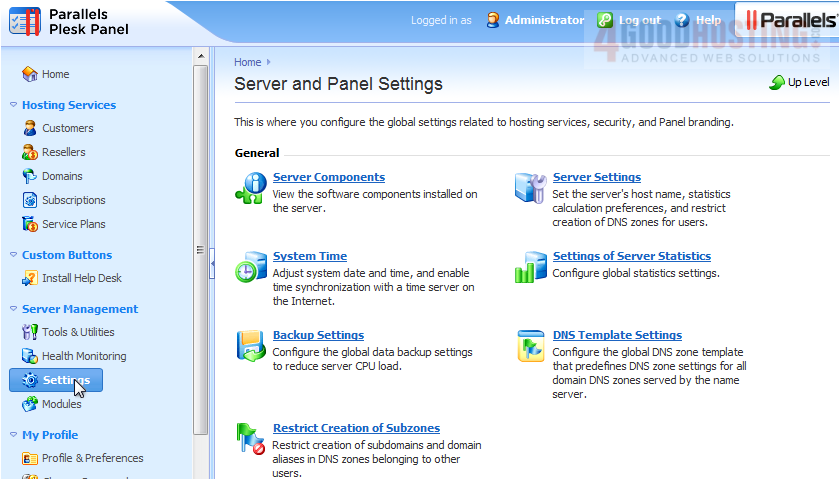
1) To change your server's hostname in Plesk, start by going to Settings, then click Server Settings.

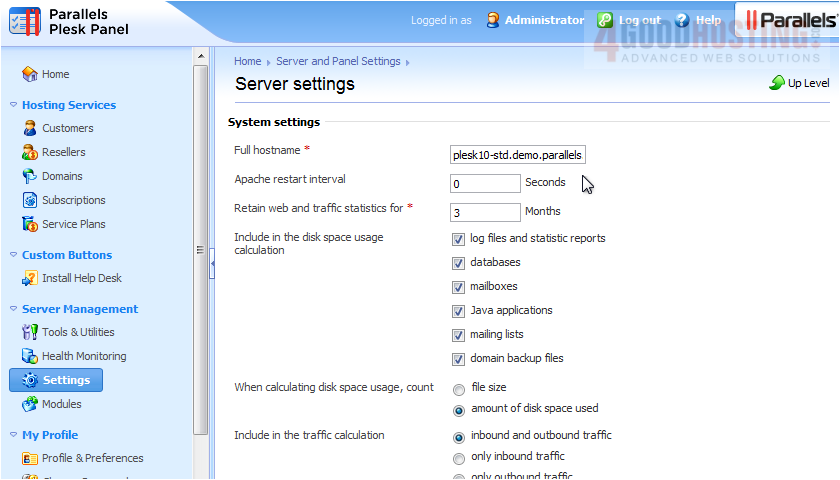
2) Specify the new hostname here.

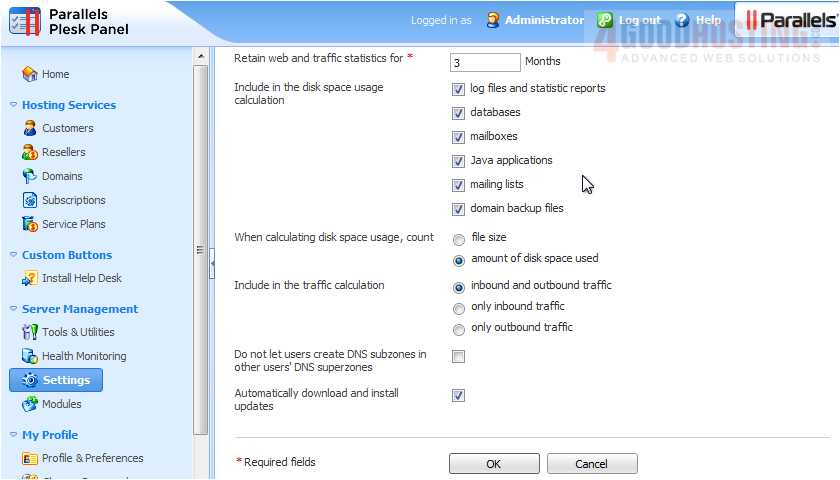
3) You can also change statistic and disk space settings here. Click OK.


That's it! Now you know how to change your server's hostname and other settings in Plesk.


Was this answer helpful?

Related Articles

Getting Started with Parallels Plesk Panel 10 Welcome to Parallels Plesk Panel 10. This version of Plesk provides you and your customers with... How to adjust the System Time in Plesk 1) To change your system time, begin by going to Settings, then click System Time.   Note... How to change the Action Log settings in Plesk You may wish to keep track of actions performed by various users in the system. All actions... How to configure and manage Database Servers in Plesk Plesk allows you to add additional Database servers for use by you and your customers. 1) Go... How to configure Mail Server and Virus Protection Settings in Plesk 1) Begin by going to Settings. 2) There are three links in the Mail category. Mail Server...
« Back

  Support

My Support Tickets
Announcements
Knowledgebase
Downloads
Network Status
Open Ticket
  • Contact Us
  • Terms of Service

Copyright © 2026 4GoodHosting. All Rights Reserved.


Loading...
Loading...

Choose Currency

$ CAD
$ USD

Generate Password

Please enter a number between 8 and 64 for the password length
⋯
Clear Chat
Sounds
true
4GH AI Helpdesk Assistant: You're not currently logged in. Please provide your name and email to start chatting with our assistant.

Are you sure you want to end this conversation?
AI Logo WGS AI Assistant